Many Home Theater PC users have been clamoring for a silent, easy-to-setup extender that can handle High Definition video - a plug & play box that lets users remotely access their HTPC content from any TV in their home.
SageTV is answering their customers desires by delivering a new HD Media Extender now available with their flagship Home Theater PC software SageTV. I had the opportunity to get a review unit to run through the paces before the extender was for sale so over the past week I've been giving this new SageTV STX-HD100 extender a workout by using it to extend my Home Theater setup. Read on to see how well the new SageTV extender performed.
My Review Setup
- Olevia HD (480i, 480p, 720p and 1080i resolution) TV
- Yamaha Receiver
- Network connected via modified, Linksys WRT54G router
- SageTV installed on a PC running Windows XP in the office (connected to Living Room TV).
Requirements - SageTV Media Center installed and fully configured on a Windows, Mac or Linux computer.
- TV with AV, S-Video or HDMI inputs
- Ethernet network cable that connects to your SageTV server
What's Included?

The extender is shipped in a fairly standard white box with details about the contents and the SageTV logo on the side.


Included with the extender is the IR remote control, two AAA batteries for the remote, a standard ethernet network cable and a standard composite AV cable. Also included is a small, 10 page setup guide that I read in its entirety in a few minutes time. The setup guide directs the reader to SageTV's website for further detail (which wasn't live at the time of my review.) The setup guide explained the easy setup process sufficiently so I had no need for further instructions. Obviously if you are new to SageTV you'll need to spend some time getting your SageTV server PC setup and working before messing with the extender, but since I already had the SageTV server setup, I had no problems and had it working in less then 10 minutes. While they did include a composite AV cable, It would be nice if they had included some HD cables such as HDMI and component cables. Fortunately I had some extras laying around and used those to hook up to my HD television.
Design
![DSC02614 (Medium)[2]](http://static.flickr.com/3211/3122270006_b872fb4f74.jpg)
![DSC02502 (Medium)[2]](http://static.flickr.com/3167/3121443767_d39d3d51a2.jpg)
The extender unit is black in color and a little smaller than a typical DVD Player (9 inches deep, 14 1/4 inches wide and just under 2 inches tall). It's very light, silent and would fit in an entertainment center or just setting next to the TV. Looking at the front of the case, there are two USB ports on the front of the unit that are currently not active. Hopefully these will be supported in future firmware updates with features such as usb keyboard/mouse support, external hard drive support etc - keep in mind any future use of these usb ports have not been confirmed or detailed by SageTV thus far.
Both sides of the extender have vents, but no fans so noise was non-existent. After multiple hours of streaming video content the box was still cool to touch as well so heat doesn't seem to be an issue either.
![DSC02599 (Medium)[3]](http://static.flickr.com/3258/3121443803_27d54c8715.jpg)
Looking towards the back of the unit you will see the power cord, an on/off switch, the AV connections and the Ethernet Port. Note that the power supply is built-in to the unit so no power brick to deal with. All-in-all the box looks sleek and is small enough to fit in any environment.
![DSC02627 (Medium)[4]](http://static.flickr.com/3232/3121443837_639f5c9e96.jpg)
![DSC02629 (Medium)[4]](http://static.flickr.com/3218/3121443899_85c52a4e07.jpg)
![DSC02628 (Medium)[4]](http://static.flickr.com/3076/3122270132_e437d188c9.jpg)
STX-HD100 File Format & Codec Support
The HD Extender supports the following file formats:
AVI, ASF, MPEG, MKV, QuickTime, MP4, Ogg, WMV, VOB (including with AC3 audio)
Video Codecs Support: MPEG-1,MPEG-2 MP@HL, MPEG-4.2 ASP@L5, H.264 up to 1080p, WMV9/VC-1 up to 1080p
Audio Codecs: MPEG Audio, AAC, Vorbis (stereo only), AC3 (decode/pass-through), WMA, FLAC, DTS (pass-through)
Remote Control
![Remote-Layout[3]](http://static.flickr.com/3197/3121443989_3c291f8460.jpg)
![DSC02532 (Medium)[4]](http://static.flickr.com/3235/3121444027_66a797c43a.jpg)
The above photos include the remote layout and the HD Extender Remote in the middle of the center photo with the Hauppauge MVP remote on it's left and my URC MX-500 remote on the right for size comparison purposes.
![DSC02538 (Medium)[2]](http://static.flickr.com/3289/3121444041_20aaf6c05c.jpg)
The above photo to the right shows the top, front of the HD extender remote where the IR emitter is located.
The remote has all of the functions you would expect and several more that any SageTV user would appreciate. The one thing that is missing from the remote is the ability to control your television set. This is unfortunate, but not a deal-breaker.
The responsiveness of the extender for each button press was nearly instant - no noticeable lag. The range however was pretty good as I could control the extender with the remote from more than 20 feet across my Family Room. The remote does seem to suffer from some minor, line-of-sight issues so at times I had to be sure the remote was pointed directly at the box. This line of site problem was less of a problem when the extender was placed lower to the ground so I'm guessing it has to do with the placement of the IR receiver on the extender. UPDATE: SageTV has corrected this problem for any new units being shipped and offered a fix for those units that already shipped with IR issues. Read more HERE
One notable thing to mention while on the topic of remote controls. I was able to control the extender with my hauppage remote control that came with my Hauppauge MVP (now used as an SD extender for SageTV.) I've also heard rumors that the MCE remote is compatible with this extender, but since I don't have that type of remote I can't confirm it.
Installation
Installation was quick and seamless. First you need to have the SageTV Media Center installed on a computer in your home of course, set up some firewall setting on your home network and enable the Media Extender Server. You connect the extender to your network with an ethernet cable, then connect the audio and video to your TV and/or AV Receiver. Then you plug in the AC plug, turn the power switch to on and wait for the HD Media Extender boot menu to come up (see screen-shot below).
![DSC02565 (Medium)[3]](http://static.flickr.com/3228/3122270326_87a7ed0e54.jpg)
Next select the settings button and you will see the following menu to adjust the various settings for the extender.
![DSC02566 (Medium)[3]](http://static.flickr.com/3288/3122270362_c11a01f69b.jpg)
Check to see if there is a firmware update available, adjust the network, video and audio setting as needed.
![DSC02570 (Medium)[2]](http://static.flickr.com/3226/3121444141_e993a2aaa4.jpg)
![DSC02574 (Medium)[2]](http://static.flickr.com/3255/3121444177_2820466aeb.jpg)
![DSC02576 (Medium)[2]](http://static.flickr.com/3074/3121444213_beff676826.jpg)
Now you can select your SageTV server (there will only be one listed unless you have more than one in your house) and it will load up the menu screen just like you're used to seeing on your SageTV Media Center.
![DSC02522 (Medium)[2]](http://static.flickr.com/3292/3122270514_30033b506d.jpg)
You'll note that since I haven't entered the license into the extender so it has the 15 day trial warning on the screen.
That's all the setup required. You can also customize the look and feel of the extender as well as install plugins to modify the extender as desired..
User Interface
![DSC02550 (Medium)[2]](http://static.flickr.com/3134/3122270540_fa7a084998.jpg)
Just as they did with their SD Extender, SageTV made the user interface on the extender mirror the SageTV server interface. Anyone familiar with the SageTV HTPC screens will feel right at home with the HD Extender. Each of the SageTV plugins (STVi's) I tried worked fine on the HD Extender. As I mentioned above, the interface is very responsive to the remote - more-so by far than our old Time Warner Cable DVR box. Changing channels and jumping through the menus on this extender were extremely fast. The user-interface animations worked well on it and you definitely do NOT get the feeling you are dealing with a Home Theater PC here. It just feels like an extension of your television albeit a much more powerful and useful one.
PERFORMANCE:
Image Quality - The image quality on the STX-HD100 is excellent. The video looked excellent on my HDTV set and has plenty of power to handle video up to 1080p. I was very happy with the image quality for all video content - including Live sports broadcasts and news shows with the scrolling tickers that sometimes give HTPC's trouble.
Sound Quality
The HD extender has connections for HDMI, Digital Audio S/PDIF (Optical) or analog. Sound from the unit was excellent - I used the S/PDIF connections for the review.
TV/PVR functionality
![DSC02557 (Medium)[2]](http://static.flickr.com/3248/3121444339_7559025cbb.jpg)
TV playback is key to my happiness with any HTPC device and this extender didn't let me down. It handled the HD content, SD content, live TV and TV guide all with ease. I had no issues with playback of recorded or live content. The extender handled comskip files (commercial detection and skipping of commercials) well just as I have come to expect from using HTPC's such as SageTV and Snapstream's Beyond TV.
SageTV can tune unencrypted HD TV channels using several different QAM tuners, Over the Air HD and DVB tuners. It can also tune HD content using the firewire port of various cable boxes as well as the R5000 mod of certain cable and satellite boxes. Anything the SageTV HTPC software can tune can be streamed on to the STX-HD100 extender. I use the HDHomeRun Qam dual tuner and receive all of my HD content that way.
Video/DVD
Playing recorded, archived video files mostly worked well. I say mostly because the extender did lock up when playing a few large AVI video files a few times during my first two days of testing. Fortunately the firmware upgrade that was available for the box seemed to fix this problem so I would imagine this was something the SageTV folks were working on and fixed via the firmware update. This is an important thing to note because future firmware updates will likely take care of any bugs that may not have been discovered during beta testing. Other than those isolated issues with the DIVX video files (fixed with the firmware update), the extender handled everything I threw at it including Mpeg, AVI, DIVX, MP4, XVID and TS video files all with no problems.
Online Video
SageTV has YouTube, Google Video and multiple other online video you can view right from the menu.
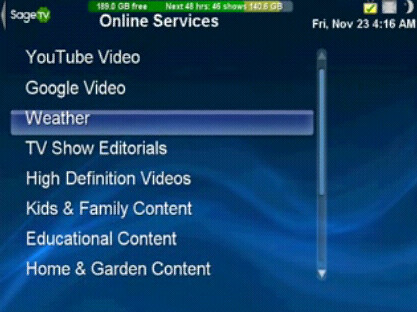
The extender handled playback of these videos well and integrated remote control functions such as pause, skip forward and skip back capability of that content with ease.
Music & Pictures
We played our Christmas music playlist streaming mp3 files stored on the SageTV server upstairs. All the functionality of your SageTV Media Center works exactly the same on the extender. Play, pause, skip to the next track etc all works perfectly from the remote control. As mentioned above the audio output from this box is excellent. While listening to the music playlist we were able to view a photo album showing past Christmas gatherings - all of this from the 10-foot interface via the remote control.
Price - When I asked Mike Machado, CEO of SageTV about the HD Extender pricing, he confirmed the $199 price of the HD Extender:
"Price will be $199 and it requires SageTV Media Center software. We will have a $249 bundle of SageTV Media Center software with the extender."
The units will go on sale at the SageTV website today (Monday, December 10th) This price includes the extender, the remote as well as the required SageTV extender license. I think this price point will be well received by current SageTV users. And for potential new SageTV customers, the $249 bundle is a savings of $29.95 compared to purchasing SageTV and the HD extender separately. You would be hard-pressed to purchase a pre-made HTPC or build your own HTPC "extender" that had the STX-HD100's capabilities for that price - especially considering the small size and weight and silent operation of this extender.
Conclusion
Positives:
- Excellent Media File Support - This extender can handle every media file I threw at it including MP4, MKV, H.264, FLAC, VOB with AC3 etc. Plus because of SageTV's support of OTA HD, unencrypted QAM, FireWire and the R5000, it can get it's HD TV content from many different sources.
- Performance - The user interface is snappy and responsive. Playback of media worked smoothly with no noticeable lags or delays.
- Silent - it might be making some noise in there, but my ears sure couldn't hear it. Compare that to your average HTPC that almost always makes a little noise at least or the XBox360 that Microsoft's Vista Media Center uses as an extender and you have the perfect media extender for your living room or even bedroom.
- TV, Music, Photos, Videos, Movie and Online content all streamed with ease from one simple interface.
- Cross-platform - This extender does require SageTV to be installed on a computer in your house to act as the media server, but remember that if you use Windows, Mac OSX, Windows Home Server or even Linux you can add SageTV to that PC as a server and connect this extender. If there's a software PVR that can handle this many different platforms out there I sure haven't found it.
- Price - $199 for a powerful media extender is very reasonable and will be difficult for competing Microsoft extenders (when they do arrive) to beat.
- No crippling DRM restrictions - You will find that SageTV will not cripple its software or hardware with DRM restrictions that prevent you from streaming or viewing certain content. This is another advantage over the Microsoft products.
Negatives:
- No Control of TV on/off - First off I'd like the remote to be able to control my TV. Having a single remote for each TV makes life easier in my house so it's a feature I would have really liked to see.
- No optical drive - Another obvious missing item is an optical drive for playing the occasional DVD or CD. For me this isn't a big deal as I have plenty of DVD players and actually I rip most of the DVD's I own to my hard drive for convenience. Most media extenders will not include this feature but it would be nice to have.
- No CableCard - Without CableCard ability in SageTV you are restricted from viewing or streaming encrypted, digital cable channels. Which HD channels are encrypted vary from one provider to another. Some cable providers keep many or most HD channels unencrypted while others only allow the local HD channels left unencrypted. Note that this isn't really a limitation of the extender as much as it is SageTV and any other company that doesn't have the cost-prohibitive and time consuming CableLabs certification (only Microsoft & TIVO currently have this.) SageTV does have the ability to tune via the FireWire port of some boxes as well as the expensive R5000 (modified cable/satellite boxes), but I mention this as it is an issue for most HTPC's in general.
Overall
I was very impressed with my overall experience with the SageTV STX-HD100 extender. It matched my SageTV interface almost exactly and handled just as well as the SageTV server does with a much easier setup than a full-fledged HTPC box. The only issue I had with the extender was one that was easily fixed with a firmware update. The positives listed above far outweigh the negatives. This extender gives you the ability to place your digital content (TV, Movies, Music and more) wherever you want it - all in a small, silent box that's affordable.
As Chris Lanier pointed out, SageTV has beat Microsoft to the market with an excellent HD extender that can handle about any file format you throw at it with great picture and sound quality. I highly recommend the SageTV STX-HD100 to anyone who owns or is considering the SageTV HTPC software for their Home Theater PC needs. This new HD extender by SageTV is an excellent solution for getting your media from your HTPC to your bedroom, living room or anywhere you have a television.
How to Purchase
If you're interested in this extender head over to SageTV's Store to order one now or to SageTV's HD Extender Information Page for further details. As this is a review unit, I won't be keeping this one, but I liked it enough that I'll likely purchase one early next year. Thanks to the guys at SageTV for the review unit. By the way, be sure to check back here at Geek Tonic and at ZatzNotFunny later this week for a special surprise.
About SageTV:
SageTV, LLC is a pioneer in DVR, home media center and home media server technologies that combine television, video, music, photos and online content into a complete, easy-to-use home media experience controlled from an existing PC or home server. SageTV Media Center, the company’s flagship product, can be deployed on either Windows, Mac or Linux and supports multiple tuners, networking and intelligent recording and includes support for a software extender, a hardware-based SD extender and now an HD extender. SageTV also has the ability to access the SageTV experience when you're away from home with SageTV Placeshifter. The company was founded in 2002 and is based in Inglewood, CA. For more information, visit www.sagetv.com.