
Computer storage space has transformed over recent years to a point where we are actually talking about how many terabytes we have in our systems instead of how many bytes or gigabytes. Home Theater PC’s are no longer limited by storage space thanks to this affordability of storage. I’ve been slowly upgrading the storage available on my HTPC’s by purchasing larger hard drives in the past few years and this year now have two 1-terabyte drives in my main HTPC computer. As I was installing my most recent 1-Terabyte drive I wondered how much storage other HTPC owners had on their systems.
A user on the SageTV forums started a poll of of the SageTV users and I added a poll on this very question of the remaining two, big-three major HTPC software makers.
How Much Hard Drive Space do HTPC users have?
This poll covers 230 HTPC users including SageTV Forum members, BeyondTV Forum Members and GreenButton Forum Members.
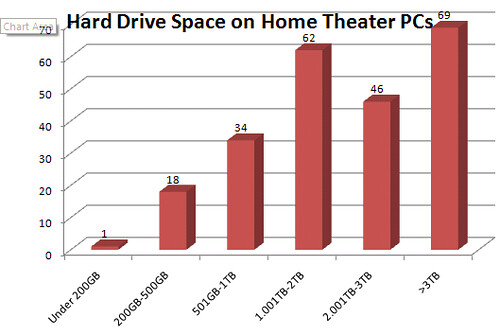
It’s quite amazing that 77% of the sampled HTPC users have over 1 Terabyte of storage. Even more significant is the 30% of the sampled HTPC users have over 3 Terabytes of storage on their HTPC’s! My guess is that as that sample size increased, the numbers would go down some, but the direction is definitely going towards the Terabyte-Plus category for HTPC’s. Those drives can hold a lot of HD Recorded shows, DVDs, Music and other Media…
To view or even submit how much HTPC storage space you have in your setup check out the polls at the following forums:
GreenButton Forum Poll (mostly MCE and VMC users, but includes other HTPC software users as well)
So the answer to “how much is enough” is a personal one, but I’d say the HTPC crowd would answer - “it’s never enough” as long as prices go down and there’s media to store.
In case you’re curious, I fall into the 3TB-Plus crowd. I have 1 Terabyte just for recorded shows which is overkill, but during Prime-Time television season we can record everything we want – wait a few months to decide on pilots we actually want to watch or not and delete those we never get to. For the rest, I’ve archive my large movie and music collection and server the entire house (and on the road) with my media. It probably takes a little geekiness to appreciate this sort of thing – but I think I fit the bill.
